Boating should feel like an escape, not a homework assignment. For newer boaters and weekend warriors, the last thing you want is to spend 20 minutes fighting a confusing app before you even leave the dock. A good marine navigation app should feel intuitive from the first time you open it. Charts should be readable at a glance. Safety features should work in the background without constant manual input. Getting underway should take seconds, not a lengthy setup session.
The market is full of options, but most apps were built for experienced mariners who already understand nautical charts, tide tables, and depth calculations. For recreational boaters, that complexity creates real risk. When you are trying to navigate a shallow bay in changing tidal conditions, you do not have time to do mental math. You need an app that does the thinking for you.
This guide focuses on what actually matters for everyday boaters: clean interfaces, fast setup, visual clarity on the water, and smart automation that works in the background. Here is how the top options compare.
What Makes a Marine Navigation App Truly Easy to Use?
Ease of use is not just about a clean home screen. It is about how the whole experience feels from download to departure. The best apps for beginners share a few consistent qualities.
They require minimal setup to get started. You should be able to download, open, and navigate within your first 10 to 15 minutes without reading a manual. Menus should be straightforward, and the most important information like speed, depth, and heading should always be visible without digging through settings.
Charts should be visually clear without requiring chart-reading expertise. Color coding, visible hazard markers, and automatic depth indication all reduce the cognitive load on new boaters. Apps that display raw depth numbers and expect you to calculate tidal offsets manually create confusion and unnecessary risk. Automatic tide-adjusted depth awareness is one of the most meaningful differentiators you will find between apps.
Strong sunlight readability matters too. You will be using this app outdoors in full sun, often with polarized sunglasses. High contrast displays with large text and clear icons are not optional.
Finally, the app should perform well on the phone or tablet you already own. It should not require specialized hardware, elaborate mounting setups, or large upfront equipment purchases.
Wavve Boating: A Strong Choice for Recreational Boaters
For most recreational boaters, Wavve Boating is a strong choice when ease of use is the priority. It was designed from the ground up for everyday boaters rather than commercial mariners, and that philosophy shows throughout the experience.
Draft-Aware Depth Shading
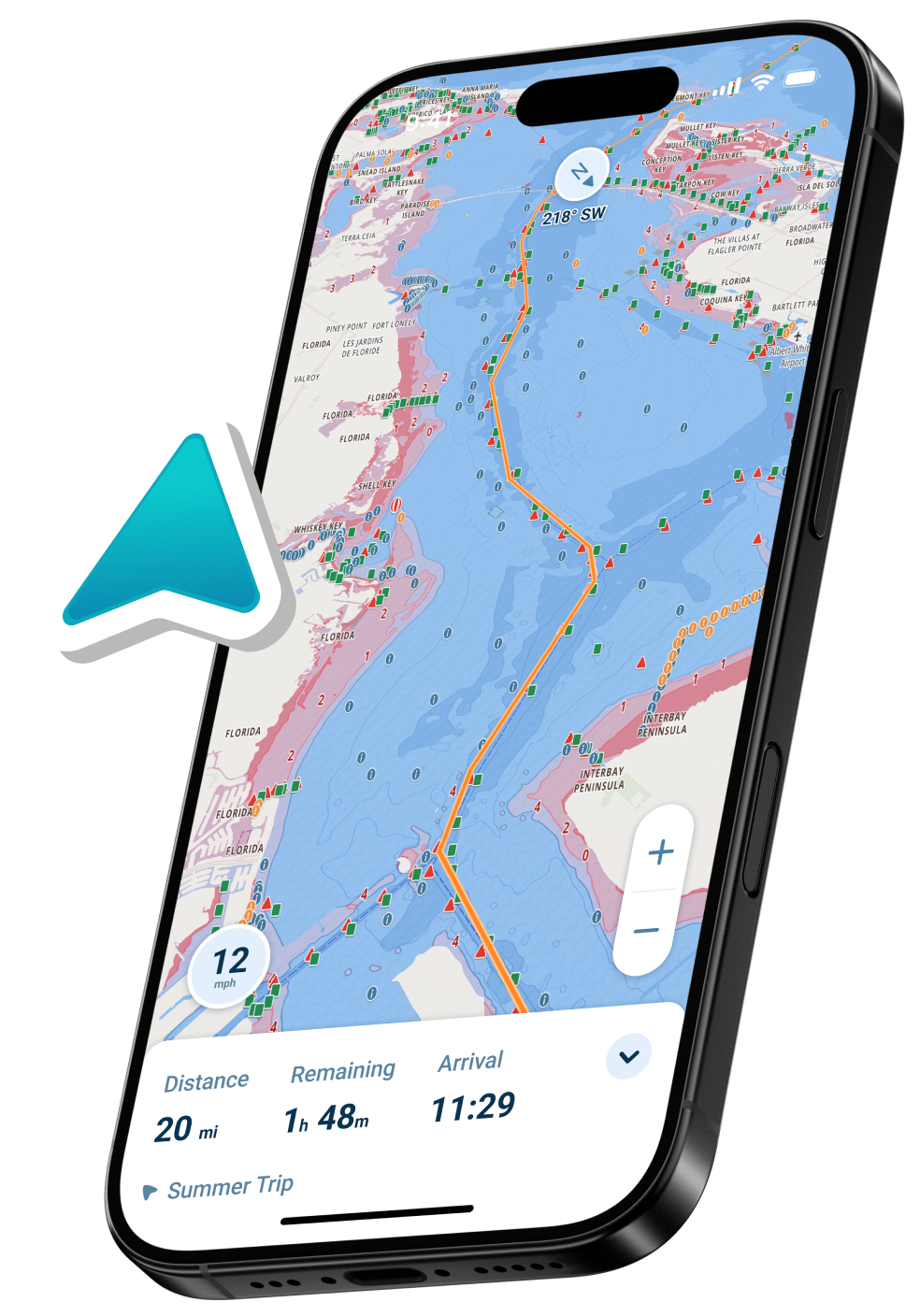
The defining feature is automatic draft-aware depth shading. You enter your boat’s draft once during setup, and the app color-codes your charts to show exactly where you can navigate safely based on current tides. Blue means you are clear. Red means it is too shallow. There is no math involved, no tide table to consult separately, and no manual adjustment needed as the tide changes. The app handles all of it in real time.
This is especially valuable in tidally dynamic areas, shallow coastal waterways, the Intracoastal Waterway, and any environment where knowing your actual safe depth right now matters more than what a chart shows at mean low water.
Clean Interface and Fast Setup
The interface is intentionally uncluttered. Speed is always prominently displayed. Chart overlays for weather, tides, and community hazard reports are accessible without crowding the main screen. The app is genuinely usable within minutes of downloading, making it well-suited for boaters who are not tech-savvy or who simply want to get on the water without a long setup session.
Pricing and Availability
Wavve Boating is available on iOS and Android. A 14-day free trial gives you full access before committing. After that, the subscription is $69.99/year or $11.99/month. All features are included at every tier with no regional chart add-ons required.
Argo Navigation: A Solid Free Option
Argo takes a familiar, map-style approach to marine navigation. The interface borrows visual cues from consumer mapping apps, which shortens the learning curve for people already comfortable with smartphone navigation.
What the Free Tier Actually Gives You
The free version is genuinely functional, not just a teaser. It includes unlimited NOAA and USACE chart access across North America, basic routing, waypoint marking, and current weather.
For recreational boaters on a budget or anyone wanting to evaluate a navigation app before committing, Argo’s free tier is a practical starting point.
Argo Premium
The Premium upgrade, currently $39.99/year, adds autorouting, offline charts, a seven-day weather and tides forecast, and custom depth shading.
Social features let you see where other boaters are going and share spots with the community, which can be useful for newer boaters still learning local waters.
Key Limitation to Know
Argo does not automatically integrate your boat’s draft with real-time tidal data. Custom depth shading is available in Premium but is not automatically tide-adjusted.
For boaters in tidally dynamic areas or shallow water environments, this is a meaningful gap. Chart coverage is also limited to North American waters.
Navionics Boating by Garmin: Reliable and Traditional
Navionics Boating, now officially called Navionics Boating by Garmin, is one of the most widely used marine charting apps available. Its chart quality is strong, it integrates well with Garmin hardware, and it has a large established user base.
Interface and Setup
For ease of use specifically, it sits in the middle of the pack. The app requires more initial setup than some alternatives, particularly around chart region downloads and subscription management. The interface is functional and routing tools work reliably, but the overall experience leans more traditional than intuitive for a first-time user.
Depth Awareness
One consistent limitation: the app does not automatically adjust displayed depths for your boat’s draft or current tides. You can view tide predictions, but the chart itself does not visually respond to that data. That means more manual interpretation during active navigation.
Pricing
The US and Canada subscription is currently $49.99/year. Regional packages for other areas are sold separately. It is a practical option for boaters already familiar with traditional nautical charts or who use Garmin hardware and want seamless integration.
Savvy Navvy: Built for Sailors
Savvy Navvy takes a different approach than the other apps here. It is built primarily for sailors, with strong emphasis on automated weather routing, Course to Steer calculations, and passage planning tools that factor in wind, tides, and weather windows together.
Who It Actually Suits
For someone planning multi-leg coastal sailing trips where weather windows and tidal routing matter significantly, it offers tools not found elsewhere at this price point. The interface is reasonably clean and the app handles complex planning tasks well.
For recreational power boaters, casual cruisers, or new boaters looking for the simplest possible day-on-the-water experience, Savvy Navvy adds complexity that does not serve their actual needs. It is a specialized tool built for a specific boater type.
Pricing
A free plan is available for US users and covers basic features with US charts. Premium starts around $99–$129/year depending on tier and region, and adds offline charts, expanded weather forecasts, departure scheduling, and advanced tide tools. Premium+ is available for global chart coverage at a higher tier. A short free trial is included when you download.
Quick Comparison
| App | Best For | Free Option | Paid Price | Draft-Aware Auto Shading |
| Wavve Boating | Recreational boaters, shallow water, beginners | 14-day trial | $69.99/yr or $11.99/mo | Yes, automatic and tide-adjusted |
| Argo Navigation | Budget-conscious boaters, North America | Yes, indefinite | $39.99/yr Premium | Manual in Premium only |
| Navionics Boating | Garmin hardware users, traditional charting | 14-day trial | $49.99/yr US and Canada | No |
| Savvy Navvy | Sailors, passage planning, weather routing | Yes, US only | $99–$129/yr Premium | No |
Tips for Beginners Getting Started
Before you head out, spend a few minutes setting the app up at home. Download the charts for your local area over Wi-Fi rather than relying on cellular coverage on the water. If your app supports draft input, enter it in the settings before you launch so the depth shading works correctly from the moment you are on the water.
Start in familiar waters before using the app somewhere new. This lets you cross-check what you see on screen against the environment you already know, which builds confidence quickly.
Mount your phone or tablet at the helm at a readable angle. A proper mount changes the experience significantly. Reading a chart off a flat surface while steering is far harder than glancing at a screen positioned at eye level.
Do not let the app replace basic seamanship. Keep your eyes up. Watch for traffic, visible hazards, and changing conditions. Any navigation app is a planning and awareness tool, not a substitute for attentiveness on the water.
Frequently Asked Questions
Do I need a paid subscription to navigate safely?
Most apps with free tiers include sufficient chart access for familiar local waters. For full offline capability, tide integration, and advanced features, paid subscriptions provide meaningfully better tools.
Can I use a marine navigation app on an older phone?
Most major apps support current iOS and Android versions. Check each app’s system requirements before downloading. Performance on very old devices may vary.
What is draft-aware depth shading?
It is a feature that uses your boat’s draft, which is the depth of your hull below the waterline, and current tide data to automatically color-code your chart. It shows which areas are safe to navigate right now without any manual calculation.
Do these apps work without cell service?
Yes. All major apps offer offline chart downloads. Tide predictions, weather updates, and community features typically require a connection to refresh, but basic GPS navigation works offline once charts are saved to your device.
Which app is best for shallow water and tidal areas?
For shallow water environments where tidal variation directly affects whether you can safely pass, an app with automatic draft-aware shading that updates in real time as tides change throughout the day offers a meaningful practical advantage.
Can I try these apps before paying?
Yes. Wavve Boating and Navionics both offer 14-day free trials with full feature access. Argo is free with an optional paid upgrade. Savvy Navvy includes a short trial period when you download.
Are marine navigation apps safe for beginners?
Yes, when used as intended. They improve situational awareness significantly for new boaters. The key is choosing an app that is clear and well-designed rather than one that overwhelms you with information you do not yet know how to use.
What if I boat in both the US and Canada?
Some apps include both regions in a single subscription with no additional chart purchase required. Others offer dedicated US and Canada packages. Check each app’s coverage page for the regions you need before subscribing.
————————-
Choosing the right marine navigation app comes down to what kind of boater you are and where you spend time on the water.
For recreational boaters navigating coastal waters, bays, or areas with tidal variation, ease of use and automatic safety features matter more than advanced technical planning tools.
Use the free trials available across most apps before committing, and prioritize the one that makes you feel confident rather than overwhelmed when you are actually out there.