Best Free Marine Navigation Apps
A complete, honest guide to free marine navigation apps, their limitations, and affordable paid alternatives that deliver significantly better value.
Let’s be direct: truly free, full-featured marine navigation apps are rare. While several apps advertise “free” downloads, most require subscriptions to access essential features like offline charts, route planning, and reliable navigation.
This doesn’t mean budget-conscious boaters are out of luck. This guide examines the best genuinely free options available, explains what you’ll sacrifice with free apps, and highlights affordable paid alternatives (including generous free trials) that deliver professional navigation without the premium price tag.
Whether you’re a weekend boater looking to save money or a serious navigator evaluating options, this comprehensive comparison helps you choose the right marine navigation solution for your needs and budget.
Understanding “Free” Marine Navigation Apps
Three Types of “Free” Apps:
- Completely Free Apps
- Basic features always free
- Limited functionality
- Often ad-supported or crowdsourced
- May lack offline capabilities
- Freemium Apps
- Free basic version
- Premium features require subscription
- Most popular apps use this model
- Usually includes time-limited trial
- Free Trial Apps
- Full features free for 7-30 days
- Requires subscription after trial
- Lets you test before committing
- Best way to evaluate premium apps
Important Reality: Professional marine navigation requires significant infrastructure, official chart licensing, server costs, continuous updates, and development resources. Completely free apps with full features are almost nonexistent because the underlying data and maintenance costs real money.
Best Truly Free Marine Navigation Apps
1. Argo Navigation – Best Free Option Overall
Price: Free (Basic) | $39.99/year (Premium) | $6.99/month (Premium)
Platforms: iOS, Android
Coverage: USA, Canada, Caribbean, Bahamas, Europe
What’s Free:
- Basic nautical charts
- GPS position tracking
- Route planning and creation
- Waypoint management
- Marine points of interest
- Social features (connect with other boaters)
- Local hazard reports
What Requires Premium:
- Auto-routing
- Advanced weather forecasts
- Extended tide/current data
- Detailed fishing charts
- Offline chart downloads
- Premium customer support
Our Verdict:
Argo offers the most generous free tier among navigation apps. The basic charts, GPS tracking, and social features work well for casual boaters in familiar waters. However, lack of offline downloads and auto-routing limits its usefulness for serious navigation.
Best For: Social boaters, weekend cruisers, budget-conscious users willing to accept limitations
Limitations: No offline capability without premium; basic weather only; limited tide data
2. OpenCPN – Free Open-Source Navigation Software
Price: Completely Free
Platforms: Windows, macOS, Linux (not mobile)
Coverage: Worldwide (charts must be downloaded separately)
What’s Free:
- Full navigation software
- GPS integration
- Route planning
- NMEA support
- Tide and current data
- Weather GRIB files
- AIS integration
- Anchor watch/alarm
What’s NOT Free:
- Charts for most regions (Canada, detailed US areas)
- Some premium chart sources require purchase
- Mobile app versions (desktop only)
Our Verdict:
OpenCPN is powerful, completely free, and beloved by cruisers and tech-savvy sailors. However, it’s desktop software (not a mobile app), requires technical setup, and you’ll still need to purchase charts for many regions.
Best For: Serious cruisers with laptop nav stations, technically skilled users, offshore sailors
Limitations: Not mobile-friendly; steeper learning curve; requires separate chart purchases for many areas
3. Garmin ActiveCaptain – Free with Limitations
Price: Free (Basic) | $29.99/year (Premium Charts)
Platforms: iOS, Android
Coverage: Worldwide
What’s Free:
- Basic chart viewing
- Community data (marina info, reviews)
- Waypoint creation
- GPS tracking
- Sync with Garmin chartplotters
What Requires Purchase:
- Detailed premium charts ($29.99/year)
- Auto Guidance routing
- Advanced navigation features
- Full offline capability
Our Verdict:
ActiveCaptain works best as a companion to Garmin hardware. The free version provides basic functionality but lacks the chart detail needed for confident navigation. At $29.99/year for premium charts, it’s affordable but still not truly free.
Best For: Garmin chartplotter owners, planning tool, marina research
Limitations: Limited chart detail on free version; primarily designed as Garmin hardware companion
4. KnowWake – Free Community-Focused App
Price: Completely Free
Platforms: iOS, Android
Coverage: USA (primarily Florida and coastal states)
What’s Free:
- Real-time boat navigation
- User-generated points of interest
- Hazard reporting
- Wake zone identifiers
- Local business directory
- Community-driven platform
Our Verdict:
KnowWake excels at community features but offers basic navigation capabilities. Charts are simplified, and coverage is strongest in Florida and select coastal regions.
Best For: Florida boaters, community engagement, finding local businesses
Limitations: Limited geographic coverage; basic charting; not suitable for offshore or complex navigation
5. Marine Ways Boating – Basic Free Navigation
Price: Free with ads
Platforms: Android
Coverage: Select regions
What’s Free:
- Basic marine charts
- GPS navigation
- Waypoint creation
- Route tracking
Our Verdict:
A simple, ad-supported option for very basic navigation needs. Lacks the polish, features, and reliability of premium apps.
Best For: Absolute beginners, extremely budget-limited users, backup option
Limitations: Ads; limited features; inconsistent updates; basic chart quality
Apps with Generous Free Trials (Better Than “Free”)
Why Free Trials Beat Permanently Free Apps:
Professional navigation apps with free trials typically offer:
- Full features during trial
- Official nautical charts
- Offline capabilities
- Real-time data
- No compromises
After the trial, you decide if the value justifies the cost. For serious boaters, this approach delivers better safety and confidence than limited free apps.
Wavve Boating – 14-Day Free Trial
Trial: 14 days, full features
Price After Trial: ~$59.99/year
Platforms: iOS, Android, Sea-Doo integration
Why It’s Worth Trying:
What You Get (Even During Trial):
- 17,000+ official nautical charts (NOAA, CHS, AHO, UKHO)
- Real-time depth shading adjusted to YOUR boat’s draft
- Automatic tide integration – charts update with water levels
- Community hazard reports from active boaters
- Marine weather & wave forecasts
- Auto-routing with draft awareness
- Offline chart downloads
- Works on jet skis (Sea-Doo integration)
What Makes Wavve Different:
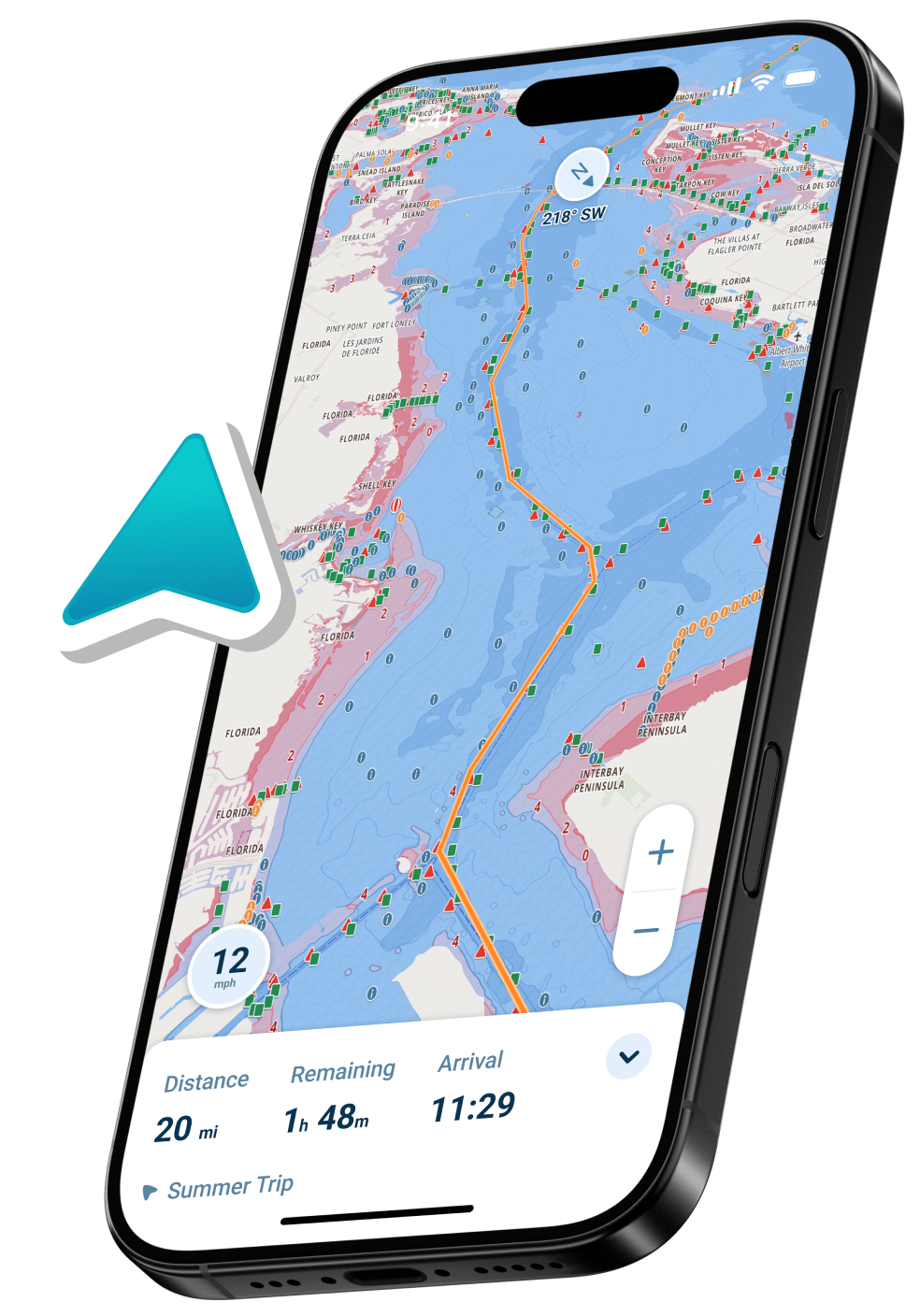
Unlike traditional chart apps that show static depths, Wavve automatically adjusts depth shading based on your vessel’s draft AND current tides. Areas that are safe appear blue; shallow areas appear red. No mental math, no guessing, just instant clarity.
The interface is designed like Google Maps for boating, clean, intuitive, and modern. New boaters understand it instantly; experienced navigators appreciate the time saved.
Our Verdict:
For recreational boaters who want professional features without hardware costs, Wavve delivers the best value. At ~$59.99/year, it costs about the same as one tank of fuel while providing safety features free apps can’t match.
Best For: All recreational boaters, jet ski riders, people who want clarity over complexity
Try Free: Explore Wavve’s charts before downloading
Navionics Boating – 14-Day Free Trial
Trial: 14 days
Price After Trial: $49.99/year (US & Canada)
Platforms: iOS, Android
What You Get During Trial:
- Detailed nautical charts
- SonarChart HD bathymetry
- Dock-to-dock auto-routing
- Tide and current data
- ActiveCaptain community
- Offline charts
Our Verdict:
Navionics is a proven, traditional navigation app with excellent chart detail and SonarChart fishing features. However, it lacks real-time depth awareness and uses a more complex interface than modern alternatives.
Best For: Fishing-focused users, Garmin hardware owners, traditional chart fans
Limitations: No draft-aware depth shading; $49.99/year is expensive for features offered
Learn more: Navionics Pricing Guide
Savvy Navvy – 14-Day Free Trial
Trial: 14 days
Price After Trial: $99/year
Platforms: iOS, Android
What You Get During Trial:
- Clean, modern charts
- Weather routing
- Course to Steer feature
- Marina and anchorage info
- Route planning
Our Verdict:
Savvy Navvy offers a beautiful interface and smart weather routing but is expensive at $99/year, double the cost of some competitors with similar features.
Best For: Sailors, weather-conscious boaters, those who prioritize interface design
Limitations: Premium pricing; less community features than alternatives
C-MAP – Free Trial Available
Trial: 14-day trial
Price After Trial: $49.99/year
Platforms: iOS, Android
What You Get During Trial:
- Detailed marine charts
- Auto-routing
- Custom depth shading
- Weather overlays
- High-resolution bathymetry
Our Verdict:
C-MAP is a solid Navionics alternative with similar features and pricing. Good option if you prefer C-MAP’s chart style.
Best For: Traditional chart users, alternatives to Navionics

Feature Comparison: Free vs Paid Navigation Apps
| Feature | Free Apps | Paid Apps (Trial) |
| Official Charts | ⚠️ Limited or basic | ✅ Full professional charts |
| Offline Use | ❌ Usually no | ✅ Download and go |
| Depth Awareness | ❌ No | ✅ Draft-specific (Wavve) |
| Real-Time Tides | ❌ Usually no | ✅ Integrated |
| Auto-Routing | ❌ No or basic | ✅ Advanced |
| Weather | ⚠️ Basic | ✅ Comprehensive marine weather |
| Community Data | ⚠️ Varies | ✅ Active reporting |
| Customer Support | ❌ Limited | ✅ Dedicated support |
| Updates | ⚠️ Infrequent | ✅ Regular chart updates |
| Safety Features | ⚠️ Minimal | ✅ Hazard warnings, alerts |
Free apps work for very casual use in familiar waters. For exploring new areas, navigating safely, or relying on your navigation, paid apps deliver dramatically better value.
How Much Do “Budget” Paid Apps Actually Cost?
Let’s put pricing in perspective:
| App | Annual Cost | Cost Per Boating Trip* |
| Wavve Boating | $59.99 | $2.40 |
| Navionics | $49.99 | $2.00 |
| Argo Premium | $39.99 | $1.60 |
| C-MAP | $49.99 | $2.00 |
| Savvy Navvy | $99.00 | $3.96 |
*Based on 25 trips per year
For less than the cost of a single fuel fill-up, you get year-round access to professional navigation, real-time safety features, and continuous chart updates. That’s $2-4 per trip for tools that prevent groundings, save fuel, and reduce stress.
When Free Apps Work (And When They Don’t)
✅ Free Apps Are Fine For:
- Exploring familiar lakes with no hazards
- Social boating on well-marked waterways
- Finding marinas and planning trips (not navigating)
- Backup to primary navigation system
- Learning basic marine navigation
- Very infrequent boating (1-2 trips/year)
❌ Free Apps Are Risky For:
- Navigating unfamiliar waters
- Coastal or offshore boating
- Areas with tides and currents
- Shallow or changing channels
- Night navigation
- Any situation where safety matters
The Hidden Cost of Free: A single grounding repair ($500-5,000) costs more than a decade of premium app subscriptions. Professional navigation isn’t an expense, it’s insurance.

Our Top Recommendation for Most Boaters
Best Value: Wavve Boating 14-Day Free Trial
Why Wavve Stands Out:
- Real-Time Depth Awareness: Enter your draft once. Wavve automatically shows safe (blue) vs shallow (red) water adjusted for current tides. No other app makes depth this clear.
- Modern, Intuitive Design: Built like modern maps apps, not 1990s chartplotters. New boaters get it instantly.
- Community Intelligence: Active boaters share hazards, anchorages, and tips in real-time, information official charts can’t provide.
- Complete Weather Integration: Marine weather, wave height, wind, and forecasts layered directly on your navigation chart.
- True Offline Capability: Download charts and data; GPS navigation works beyond cell service.
- Works Everywhere: Phone, tablet, Sea-Doo displays, same subscription works on all your devices.
14-Day Free Trial = Full Access
Try every feature risk-free. If it doesn’t meet your needs, you haven’t spent anything.
After Trial: ~$59.99/year (often less with promotions)
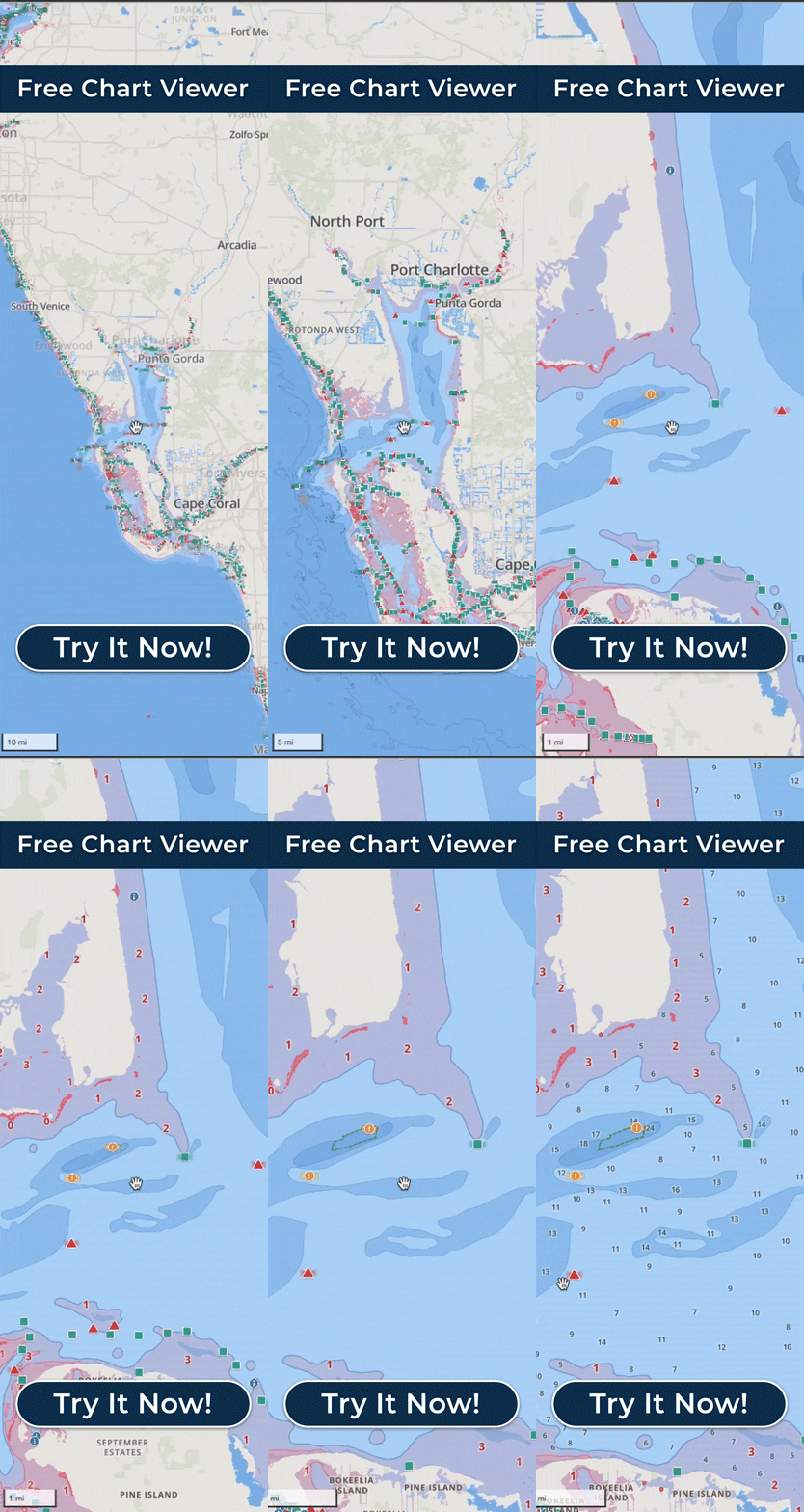
Explore Before Downloading: Free Wavve Chart Viewer – No signup required
Free vs Paid: Real-World Scenario
Scenario: Weekend trip to unfamiliar anchorage
With Free App:
- Basic chart with limited detail
- No offline capability (loses GPS track if signal drops)
- Static depths (you calculate tide effects manually)
- No real-time hazard warnings
- Hope for the best
With Wavve Boating:
- Official NOAA charts with full detail
- Downloaded for offline use (works beyond cell service)
- Depth automatically adjusted for your boat + current tide
- Community reports warn of recent hazards
- Auto-routing suggests safest path
- Confidence and safety
Cost Difference: $0 vs $5 (1/12 of annual subscription)
Value Difference: Priceless
How to Choose the Right App for Your Needs
Choose Free Apps If:
- You boat 1-2 times per year in familiar waters
- You have another primary navigation system
- You’re just learning and experimenting
- Budget is absolutely zero (truly no flexibility)
Choose Paid Apps (with Free Trials) If:
- You boat regularly (5+ times/year)
- You explore new waters or coastal areas
- Safety and confidence matter
- You want real-time depth and tide awareness
- You can afford $2-5 per boating trip
- You value modern, intuitive interfaces
Smart Approach:
Try multiple free trials (Wavve, Navionics, C-MAP) over a few weeks. Use them on actual boating trips. Pick the one that feels most intuitive and delivers the features you actually use.
Alternative Budget Navigation Solutions
Beyond Apps: Other Low-Cost Options
- Free Paper Chart Sources
- NOAA ENC charts (download free, print yourself)
- Canadian CHS RNCs (free digital downloads)
- Works offline, no tech required
- Doesn’t update automatically
- Browser-Based Chart Viewers
- Wavve Free Chart Viewer
- NOAA Chart Viewer
- Good for planning, not navigation
- Basic GPS Units
- Handheld marine GPS ($100-200)
- Waypoint marking only, no charts
- Useful backup option
Common Questions About Free Navigation Apps
Q: Why aren’t there more truly free marine navigation apps?
A: Professional nautical charts cost money to license from hydrographic offices. App development, servers, chart updates, and support all require ongoing funding. “Free” apps either limit features, show ads, or rely on volunteer crowdsourcing that can’t match professional quality.
Q: Are free marine navigation apps safe?
A: Free apps with official chart sources (like Argo’s free tier) are generally safe for basic use in familiar waters. However, they lack critical features like offline capability, real-time updates, and advanced routing that improve safety in unfamiliar or challenging conditions. For serious navigation, paid apps deliver significantly better safety.
Q: Can I use Google Maps for boating?
A: No. Google Maps doesn’t show nautical charts, water depths, nav aids, or hazards. It’s designed for roads, not water. However, modern marine apps like Wavve Boating offer the same intuitive interface as Google Maps but purpose-built for boating.
Q: What’s the cheapest reliable marine navigation app?
A: Argo Navigation ($39.99/year premium) is the lowest-cost option with decent features. However, Wavve Boating at ~$59.99/year delivers significantly more value with draft-aware depth shading, real-time tides, and better chart integration, making it the best value per dollar spent.
Q: Do free trials require credit cards?
A: Most do, but you can cancel before the trial ends. Wavve, Navionics, and other major apps offer 14-day trials that let you test full features before committing.
Q: Can I just use my fishfinder for navigation?
A: Fishfinders like Garmin Striker provide GPS and depth but lack nautical charts, nav aids, and hazard warnings. They’re excellent for fishing, inadequate for safe navigation. Combine with proper marine navigation apps for complete coverage.
Q: Are paid marine apps better than free ones?
A: Yes, dramatically. Paid apps provide official charts, offline capability, real-time data, auto-routing, weather integration, and customer support that free apps can’t match. For $50-100/year, you get professional tools that prevent costly mistakes.
Q: How much should I budget for marine navigation?
A: Budget $50-100/year for app subscriptions, or $300-800 one-time for basic hardware. Apps deliver better features-per-dollar and update automatically. Hardware is more permanent but costs more upfront.
Q: Can I use multiple free trials to never pay?
A: Technically possible but impractical and ethically questionable. You’d lose saved routes, waypoints, and familiarity. Apps typically limit free trials per account. Better to identify the app you like during trials, then subscribe for confidence and full access.
Q: What free app works best for jet skis?
A: KnowWake’s free version works but has limited coverage. For jet skis and PWCs, Wavve Boating (14-day trial, then ~$59.99/year) offers better shallow-water focus, speed, and Sea-Doo integration worth the modest cost.
Final Recommendation: Value Over “Free”
The best marine navigation isn’t free, it’s affordable and worth every penny. A $50-60 annual subscription costs less than:
- One tank of boat fuel
- A single dock dinner
- Annual boat insurance deductible
- A basic boat repair
Yet it provides:
- Peace of mind
- Safer navigation
- Time saved planning
- Stress-free exploring
- Grounding prevention
Start with free trials. Test features on real trips. Choose the app that makes you most confident.
Try Wavve Boating Free for 14 Days – Full features, no commitment, no risk.
Content
- Best Free Marine Navigation Apps
- Understanding “Free” Marine Navigation Apps
- Best Truly Free Marine Navigation Apps
- Apps with Generous Free Trials (Better Than “Free”)
- Feature Comparison: Free vs Paid Navigation Apps
- How Much Do “Budget” Paid Apps Actually Cost?
- When Free Apps Work (And When They Don’t)
- Our Top Recommendation for Most Boaters
- Free vs Paid: Real-World Scenario
- How to Choose the Right App for Your Needs
- Alternative Budget Navigation Solutions
- Common Questions About Free Navigation Apps
- Final Recommendation: Value Over “Free”